
CS 142: Computer Science II Java, Spring 2024
Instructors: Allison Obourn (allison.obourn)
Week 8: Lab 15
You will need to complete lab 15 on your own computer, not on CodeStepByStep.
Today in lab we will be writing a program that works and looks like the one in the animated gif below.
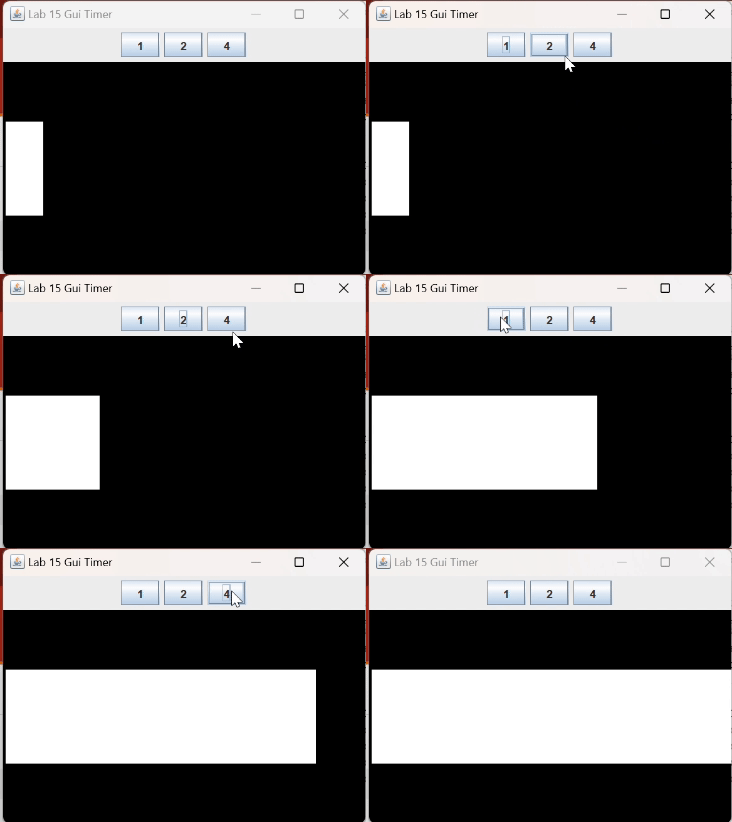
- Create a GUI that looks like the one above. WHen the window size is increased the three buttons should stay on one line and the animation area should increase in size.
- Add a listener to the buttons so that when clicked the number on the clicked button is printed out.
- Add a timer that prints out a message every second.
- Alter the timer listener so that it draws a white rectangle the selected button's number of pixels right of the last time the timer went off.